
Looking to boost your online sales and reach a wider audience? Connecting your online store to Google Merchant Center is a crucial step. This platform allows you to showcase your products directly to potential customers on Google Shopping, maximizing your visibility and driving traffic to your website. This comprehensive, step-by-step guide is designed for beginners, simplifying the process of connecting your store to Google Merchant Center and optimizing your product listings for success on Google Shopping. Learn how to leverage the power of Google Merchant Center to increase your product visibility, attract more qualified leads, and ultimately, drive conversions and grow your business.
This guide will walk you through every stage, from creating a Google Merchant Center account to uploading your product feed and setting up shipping and tax information. We’ll cover best practices for optimizing your product data, including crafting compelling product titles and descriptions, and selecting the right product categories. By following this guide, you’ll be able to seamlessly integrate your store with Google Merchant Center, giving your products the exposure they deserve on Google Shopping and across the wider Google network. Master the essentials of Google Merchant Center and unlock the potential to significantly expand your online reach and boost your bottom line.
Understanding the Benefits of Google Merchant Center
Google Merchant Center acts as a bridge between your online store and Google’s shopping platforms, unlocking a wealth of benefits for your business. By connecting your store, you gain increased visibility and reach a wider audience of potential customers actively searching for products like yours.
Listing your products on Google Shopping provides a rich shopping experience, showcasing high-quality images and detailed product information directly within search results. This enhanced visibility can significantly increase click-through rates and drive qualified traffic to your website.
Improved campaign performance is another key advantage. Merchant Center data integrates seamlessly with Google Ads, enabling more effective shopping campaigns. You can target specific demographics and interests, optimizing your ad spend and maximizing your return on investment.
Finally, Merchant Center provides valuable insights into your product performance. Track impressions, clicks, and conversions to understand what’s working and identify areas for improvement. This data-driven approach empowers you to make informed decisions and refine your sales strategies.
Creating a Google Merchant Center Account
Setting up your Google Merchant Center account is the first step towards showcasing your products on Google Shopping. This process is straightforward and involves a few key steps.
First, navigate to the Google Merchant Center website. You’ll need a Google account to proceed. If you manage other Google services like Google Ads, it’s recommended to use the same account for streamlined management.
Once you’re on the Merchant Center homepage, click the “Sign up” button. You’ll be prompted to provide essential information about your business, including your business name, country, and time zone. Accept the terms and conditions to continue.
Next, you’ll need to verify and claim your website URL. This confirms you own the website associated with your product listings. Google offers several verification methods, such as adding a meta tag to your site’s HTML or uploading an HTML file to your server. Choose the method that best suits your technical capabilities.
After successful verification, you’ll officially have a Google Merchant Center account. You can then proceed to configure your shipping settings, tax information, and other relevant details.
Preparing Your Product Feed
A product feed is a structured file containing all the necessary information about your products. This feed is what Google uses to display your products in Shopping ads and other relevant services. Accuracy and completeness are crucial for successful campaigns.
There are several ways to create your product feed, including:
- Using a spreadsheet program: Create a spreadsheet with columns for each required attribute (e.g., ID, title, description, price, availability). This method is suitable for smaller inventories.
- Using a feed management tool: These tools automate the process of creating and optimizing your feed, especially beneficial for larger catalogs.
- Content API: For larger and more complex inventories, the Content API offers a more direct and scalable way to manage your product data.
Required attributes usually include: ID, title, description, link, image link, price, availability, condition, and brand. Optional attributes, while not mandatory, can enhance your product listings, allowing for better targeting and visibility.
Once your feed is ready, you’ll upload it to Google Merchant Center. You can choose from various upload methods depending on your feed size and technical capabilities: Scheduled Fetch, upload, or the Content API.
Connecting Your Store Platform to Google Merchant Center
Connecting your store platform simplifies product data submission and keeps your inventory synchronized with Google Merchant Center. The connection method depends on your e-commerce platform. Many popular platforms offer direct integrations with Google Merchant Center.
For supported platforms, you’ll typically find a “Google Merchant Center” or “Google Shopping” section within your platform’s settings or app store. Follow the platform-specific instructions to link your account.
If a direct integration isn’t available, you can often use a content API or a third-party feed management tool to connect your store. These tools automate the process of creating and submitting your product feed to Google Merchant Center.
Regardless of your chosen method, ensure accurate and complete product information is consistently sent to Google Merchant Center. Regular updates are essential for a successful shopping campaign.
Troubleshooting Common Connection Issues
Connecting your store to Google Merchant Center can sometimes encounter hiccups. This section outlines common issues and solutions to help you get your products listed successfully.
Product Feed Errors
Incorrect formatting in your product feed is a frequent culprit. Ensure your feed adheres to Google’s specifications, including correct attribute names and data types. Missing required attributes, such as ‘id’ and ‘title’, will also prevent successful connection. Review Google’s documentation for specific requirements.
Account Issues
Incorrect website URL in your Merchant Center account can lead to connection failures. Double-check the URL you provided matches the domain of your store. Unverified website is another common issue. Ensure you’ve completed the website verification process in Google Search Console.
Platform-Specific Issues
Some e-commerce platforms have specific plugin or app requirements for Google Merchant Center integration. Check your platform’s documentation for recommended plugins or connection instructions. Platform updates can also cause temporary connection issues. Contact your platform’s support for assistance if necessary.
Submitting Your Product Feed for Review
After meticulously crafting your product feed, the next crucial step is submitting it to Google Merchant Center for review. This process ensures your feed adheres to Google’s guidelines and is ready to power your Shopping campaigns.
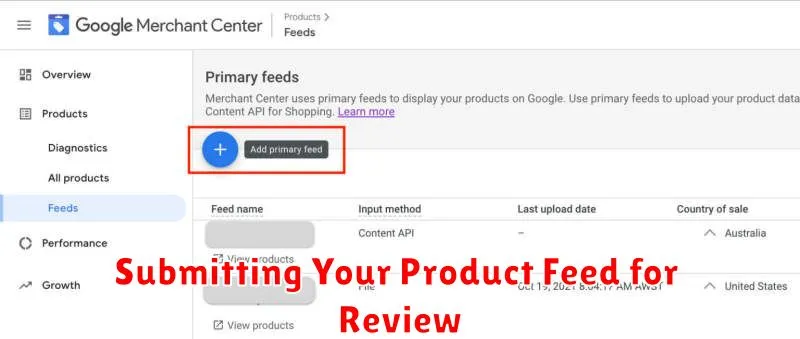
Within your Merchant Center account, navigate to the “Products” section and select “Feeds.” Click the “Add a new feed” button. Provide a descriptive name for your feed and choose the appropriate input method (e.g., scheduled fetch, upload, Content API). Specify the target country and language for your product listings. Then, submit your feed’s file location or configure the selected input method.
Once submitted, Google will begin processing your feed. This may take some time. You can monitor the processing status within the “Feeds” section. Pay close attention to any warnings or errors that Google flags. Address these promptly to expedite the approval process.
Regular updates are essential. Ensure your feed is refreshed regularly to reflect current inventory, pricing, and availability. This prevents disapprovals and ensures a seamless shopping experience for potential customers.
Optimizing Your Product Listings for Google Shopping
After submitting your product feed, focus on optimizing your product listings for better visibility and click-through rates. Accurate and detailed product data is key for Google to understand your offerings and match them with relevant user searches.
Product titles should be concise and informative, highlighting key features and brand names. Use relevant keywords that shoppers are likely to use when searching for your products.
High-quality images are crucial. Showcase your products clearly, using professional photography with good lighting and minimal distractions. Provide multiple images from different angles to give shoppers a complete view.
Writing compelling product descriptions is essential. Clearly communicate the benefits and features of your products, highlighting what makes them unique. Use natural language and avoid keyword stuffing.
Accurate pricing and availability information is crucial. Ensure your product feed reflects the current price and stock status to avoid misleading customers.
Monitoring Your Performance in Google Merchant Center

Regularly monitoring your performance in Google Merchant Center is crucial for optimizing your Google Shopping campaigns and ensuring profitability. Key metrics to track include:
- Clicks: The number of times users click on your product listings.
- Impressions: The number of times your product listings are shown.
- Click-Through Rate (CTR): The percentage of impressions that result in clicks. A low CTR might indicate issues with your product titles or images.
- Cost: The amount spent on your Google Shopping ads.
- Conversion Rate: The percentage of clicks that lead to a purchase on your website.
- Return on Ad Spend (ROAS): A key metric showing the revenue generated for every dollar spent on advertising.
Use these metrics to identify areas for improvement. For example, a low CTR might indicate the need to optimize product titles and images. A low conversion rate could suggest issues with your website’s checkout process. Regular monitoring enables you to make data-driven decisions to improve your Shopping campaign’s effectiveness.
