

In today’s fast-paced digital world, site speed is paramount to success. A slow-loading website can significantly impact your conversion rates, leading to lost customers and revenue. This article will explore actionable tips to improve site speed and, ultimately, enhance your conversions. We’ll delve into various techniques, from optimizing images and leveraging browser caching to minimizing HTTP requests and choosing the right hosting provider. Understanding the importance of site speed optimization is the first step toward a more profitable online presence.
Improving your site speed isn’t just about technical tweaks; it’s about creating a better user experience. Faster loading times lead to increased user engagement, lower bounce rates, and higher conversions. By implementing the tips discussed in this article, you can create a website that is not only fast but also more effective at converting visitors into paying customers. Prepare to unlock the potential of a truly optimized website and watch your conversions soar. This guide provides the knowledge you need to make site speed optimization a cornerstone of your online strategy.
Understanding the Impact of Site Speed on Conversions
In today’s fast-paced digital landscape, site speed plays a critical role in online success. A slow website can significantly impact conversion rates, leading to lost revenue and frustrated users.
Studies have shown a direct correlation between page load time and bounce rate. When a page takes too long to load, visitors are more likely to abandon it before even engaging with the content. This translates directly into lost opportunities for conversions, whether it’s a purchase, a sign-up, or a lead generation.
User experience is paramount. A fast-loading website provides a seamless and positive browsing experience, encouraging users to explore further and ultimately leading to higher engagement and conversion rates. Conversely, a slow website creates a negative impression, potentially damaging your brand reputation and driving users towards your competitors.
Furthermore, site speed is a ranking factor for search engines. Faster websites are often rewarded with higher rankings, leading to increased organic traffic and potentially more conversions.
Key Metrics for Measuring Site Speed
Understanding how to measure site speed is crucial for effective optimization. Several key metrics provide valuable insights into performance.
First Contentful Paint (FCP) measures the time it takes for the browser to render the first piece of content from the DOM, indicating the perceived start of the page load. This could be text, an image, or a non-white canvas element. A lower FCP generally corresponds to a better user experience.
Largest Contentful Paint (LCP) focuses on the render time of the largest content element visible within the viewport. This is often a hero image, a large block of text, or a video. LCP provides insight into how quickly the main content is perceived as loaded.
Time to Interactive (TTI) measures how long it takes for the page to become fully interactive. This means the page displays useful content, event handlers are registered for most visible page elements, and the page responds to user interactions within 50 milliseconds.
Optimizing Images for Web Performance

Images often constitute a significant portion of a webpage’s size, directly impacting loading times. Optimizing images is crucial for a faster website and improved user experience. Image optimization involves reducing the file size without significantly compromising visual quality.
Choosing the right file format is the first step. Generally, JPEG is suitable for photographs, while PNG is preferred for graphics with sharp lines and transparency. WebP, a modern format, offers superior compression and quality compared to both JPEG and PNG. Consider using WebP if browser compatibility allows.
Compression plays a vital role. Tools and online services can significantly reduce file sizes without noticeable quality loss. Experiment with different compression levels to find the optimal balance.
Resizing images to the dimensions they are displayed on the webpage prevents the browser from downloading larger images and then scaling them down, saving bandwidth and time. Specify image dimensions in your HTML or CSS.
Leveraging Browser Caching
Browser caching is a powerful technique to improve website speed. It allows the browser to store static assets, such as images, CSS files, and JavaScript files, locally on the user’s computer. When a user revisits the site, the browser can load these assets from its cache instead of downloading them again from the server. This significantly reduces the amount of data that needs to be transferred, resulting in faster page load times.
You can control how your server instructs browsers to cache content by setting appropriate HTTP headers. These headers specify how long different file types should be stored in the browser’s cache. By configuring these headers correctly, you can ensure that frequently accessed files are cached effectively, minimizing server load and improving user experience.
Setting Cache-Control Headers
The Cache-Control header is the most effective way to manage browser caching. You can set various directives, such as max-age, to specify the caching duration in seconds.
Minifying CSS and JavaScript Files
Minifying CSS and JavaScript files is a crucial step in optimizing website performance. This process removes unnecessary characters, whitespace, and comments from your code without altering its functionality. The result is smaller file sizes, which lead to faster download speeds and improved page load times.
Minification streamlines the code, reducing the amount of data that needs to be transferred between the server and the user’s browser. This is particularly beneficial for users with slower internet connections or limited data plans. Smaller files translate to a more efficient use of bandwidth, ultimately enhancing the user experience.
There are various tools available for minifying CSS and JavaScript, both online and offline. Many code editors offer built-in minification features, or you can utilize dedicated websites and command-line tools. Integrating minification into your workflow, whether through automated tasks or manual processes, can significantly contribute to a faster and more responsive website.
Improving Server Response Time
Server response time, often referred to as Time To First Byte (TTFB), signifies the duration it takes for a user’s browser to receive the first byte of data from your web server. A slow server response can significantly impact the overall user experience and hinder conversion rates. Optimizing TTFB is crucial for a fast-loading website.
Several factors contribute to slow server response times. Database queries can be a major culprit. Inefficient or complex queries can bog down the server. Lack of sufficient server resources, like RAM or CPU, can also lead to delays. Furthermore, slow application logic or inefficient code within your website’s backend can contribute to prolonged server responses.
To address these issues, consider optimizing your database queries for better performance. Ensure your server has adequate resources to handle the traffic. Review and refine your application logic for efficiency. Implementing server-side caching can also drastically reduce response times by storing frequently accessed data for quick retrieval.
Utilizing a Content Delivery Network (CDN)
A Content Delivery Network (CDN) is a geographically distributed network of servers that work together to provide fast delivery of internet content. By caching content like images, videos, and other web files, a CDN brings that content closer to users based on their geographic location. This proximity reduces latency, meaning faster load times for your website visitors.
Reduced latency translates to a better user experience. When a user accesses your site, the CDN’s server closest to them delivers the cached content. This significantly decreases the distance the data has to travel, resulting in quicker page loads.
CDNs also offer improved redundancy. Because your content is distributed across multiple servers, if one server goes down, another can seamlessly take over. This prevents site outages and ensures consistent availability for your visitors.
Mobile-First Approach to Site Design
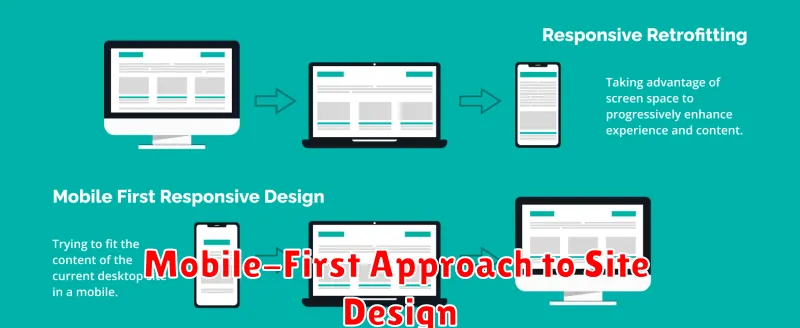
In today’s mobile-centric world, a mobile-first approach to website design is crucial for site speed and conversions. Designing for smaller screens first forces you to prioritize content and streamline the user experience. This naturally leads to a leaner, faster-loading website that benefits users on all devices.
Prioritize essential content. By starting with mobile, you’re compelled to identify the most important elements of your site and feature them prominently. This eliminates unnecessary clutter and improves loading times.
Optimize images for mobile. Large image files can significantly slow down mobile page load speeds. Using appropriately sized images and modern image formats like WebP can drastically reduce image file sizes without sacrificing quality.
Embrace responsive design. Responsive design ensures your website adapts seamlessly to different screen sizes, providing a consistent user experience regardless of device. This avoids the need for separate mobile sites, which can be slower and more difficult to maintain.
Regular Site Speed Testing and Monitoring
Consistent monitoring is crucial for maintaining optimal site speed. Regular testing allows you to identify performance regressions early and address them promptly before they impact user experience and conversions.
Utilize various tools to gain a comprehensive understanding of your site’s speed. WebPageTest and Google PageSpeed Insights provide detailed performance reports and actionable recommendations. Track key metrics like First Contentful Paint (FCP), Largest Contentful Paint (LCP), and Time to Interactive (TTI).
Establish a regular testing schedule, such as weekly or bi-weekly tests. This frequency allows you to catch performance issues before they significantly impact users. Automated testing tools can further streamline this process and alert you to any sudden drops in performance.
Monitor your site speed during peak traffic periods to identify bottlenecks under stress. This proactive approach helps ensure a consistent user experience even during high demand.
