
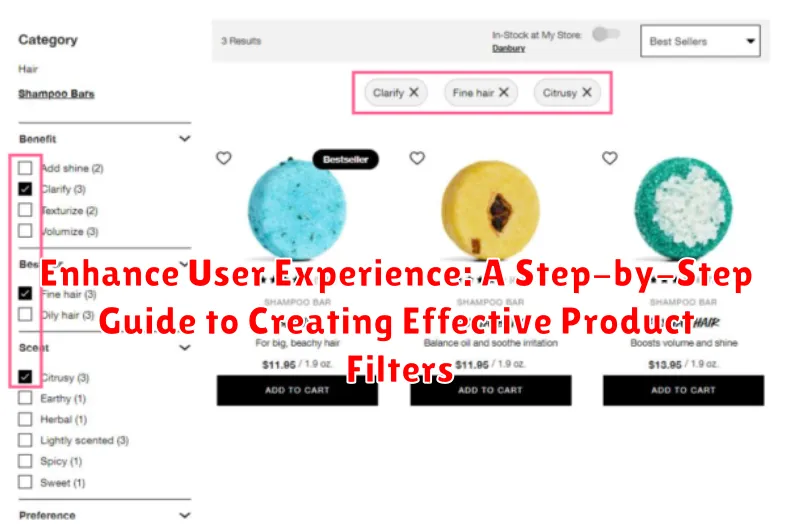
In today’s fast-paced digital landscape, a seamless user experience (UX) is paramount to the success of any online product. Users expect to find what they need quickly and efficiently. Product filters play a crucial role in this process, enabling users to refine their search and discover desired items with ease. Effective product filtering enhances user satisfaction, reduces bounce rates, and ultimately drives conversions. This comprehensive guide offers a step-by-step approach to designing and implementing effective product filters that cater to user needs and elevate the overall user experience.
This guide will delve into the intricacies of creating product filters, covering best practices for design, functionality, and user-centered considerations. From understanding user behavior and defining filter categories to implementing dynamic filtering options and optimizing for mobile devices, this guide provides a comprehensive roadmap for creating effective product filters that enhance user experience and contribute to business success. Whether you are an e-commerce business, a product manager, or a UX designer, this guide will empower you to create product filters that transform the way users interact with your product offerings.
Understanding the Importance of Product Filters
Product filters play a crucial role in enhancing user experience within e-commerce platforms and product browsing interfaces. They empower users to quickly and efficiently find the products they need, reducing search time and frustration.
Effective filtering leads to increased user satisfaction. By allowing users to refine their search based on specific criteria, filters eliminate the need to manually sift through irrelevant results. This streamlined process improves conversion rates by guiding users directly to desired products.
Improved navigation is another key benefit of robust product filters. Filters present users with a clear and organized path to explore a product catalog, eliminating the feeling of being overwhelmed by a vast selection. This organized approach promotes a sense of control and encourages users to explore further.
By catering to individual preferences, filters also personalize the shopping experience. This level of customization leads to higher engagement and fosters a sense of connection between the user and the platform.
Planning Your Filtering Strategy: User Needs and Product Attributes
A successful filtering strategy hinges on understanding both user needs and product attributes. Begin by thoroughly researching your target audience. User research, including surveys, user interviews, and analyzing search queries, can reveal what criteria are most important to users when browsing products.
Next, conduct a comprehensive product attribute analysis. Catalog all relevant attributes of your products, such as size, color, price, brand, material, and any other distinguishing features. Consider which attributes are searchable and how users might expect to filter by them.
Prioritize filters based on user needs and the frequency of specific attributes within your product catalog. Filters for common attributes should be readily available, while less common ones can be nested or offered as secondary filtering options. This balance ensures a streamlined user experience while catering to diverse search preferences.
Types of Product Filters and Their Applications
Effective product filtering relies on utilizing the right filter types for your product catalog. Choosing the correct filters significantly impacts user experience and conversion rates. Below are common filter types and their applications:
Basic Filters
These are fundamental filters suitable for most e-commerce platforms. Category filters allow users to browse within specific product categories. Price range filters enable users to set minimum and maximum price limits. Brand filters let users select products from preferred brands.
Attribute Filters
Attribute filters narrow down product selection based on specific product characteristics. For example, in clothing, attributes might include size, color, material, and style. For electronics, attributes could include screen size, processor speed, or battery life. Effectively using attribute filters requires a deep understanding of your product catalog and user needs.
Facet Filters
Facet filters, often presented as clickable options, provide a dynamic way to refine search results. These are particularly useful when users have a general idea of what they’re looking for but need to explore different aspects of a product. Facets can be combined to create highly specific searches.
Tag Filters
Tag filters allow users to browse by keywords or tags associated with products. This type of filter is beneficial for products with diverse attributes or when users might search using different terminology. Tag filtering offers flexibility in product discovery.
Designing User-Friendly Filter Interfaces
A well-designed filter interface is crucial for a positive user experience. Clarity and ease of use are paramount. Users should quickly grasp how to utilize the filters to refine their search results.
Placement is key. Position filters where users expect to find them, typically in a left-hand sidebar or horizontally above product listings. Visual hierarchy should clearly distinguish filter categories and options. Utilize headings, whitespace, and potentially visual cues like icons to improve scannability.
Interactive elements enhance usability. Consider using checkboxes for multi-select filters, radio buttons for single selections, and sliders for numerical ranges. Real-time updating of results as users select filters provides immediate feedback and streamlines the search process.
Mobile optimization is essential. Ensure filters adapt seamlessly to smaller screens. Consider collapsible filter menus or a dedicated filter button to conserve screen real estate while maintaining functionality.
Implementing Filters: Best Practices and Technical Considerations
Effective filter implementation requires careful consideration of both user experience and technical performance. Performance is paramount; filters should be fast and responsive to avoid frustrating users. Employing efficient database queries and indexing strategies is crucial.
Partial page updates via AJAX can significantly improve the user experience by updating only the product display area without a full page reload. This creates a more dynamic and seamless filtering process.
Data handling is another key aspect. Consider how to manage large datasets and complex filtering logic. Techniques like server-side filtering or a combination of server-side and client-side filtering can optimize performance depending on the data volume and application requirements.
Mobile optimization is essential. Filters should be easily accessible and usable on smaller screens. Consider using a dedicated filter button or a slide-out panel to avoid cluttering the limited screen space.
Finally, thorough testing and monitoring are critical. Test the filter functionality with representative user data and monitor performance metrics to identify and address any bottlenecks.
Testing and Optimizing Filters for Conversion

After implementing product filters, rigorous testing is crucial to ensure they drive conversions. A/B testing is a highly effective method. Compare different filter designs, placements, and even the wording of filter labels. Track key metrics like conversion rates, average order value, and bounce rates to determine which variations perform best.
Usability testing provides valuable qualitative insights. Observe users interacting with the filters. Identify any pain points or confusion they experience. This direct feedback helps pinpoint areas for improvement and ensures a smooth user experience.
Continuously analyze filter usage data. Identify underutilized filters and consider removing or revising them. Popular filters might need further refinement or expansion to cater to user preferences. This iterative process of testing and optimization is key to maximizing filter effectiveness and driving conversions.
Mobile Optimization: Adapting Filters for Smaller Screens
Mobile optimization is crucial for effective product filtering. Smaller screens present unique challenges, requiring a tailored approach to ensure a seamless user experience.
Consider using a collapsible filter menu that hides filter options by default, maximizing screen real estate for product browsing. This prevents the filters from overwhelming the user upon initial page load.
Prioritize essential filter categories. Present the most frequently used filters upfront, allowing users to quickly refine their search. Less common filters can be nested within expandable sections or a “More Filters” option.
Input methods should be optimized for touch. Sliders, large checkboxes, and dropdown menus with clear labels are easier to interact with on mobile compared to small text fields or multiple select boxes.
Streamlined design is essential. Avoid overwhelming users with excessive filter options or complex layouts. Keep the interface clean and intuitive, ensuring a smooth filtering process on smaller screens.
Using Analytics to Improve Filter Performance
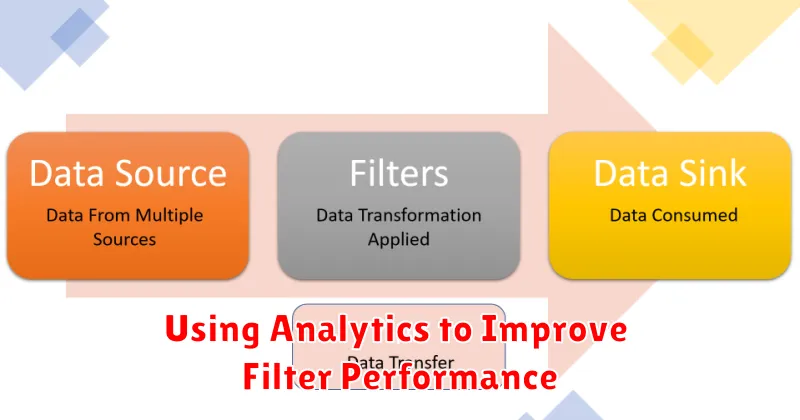
Leveraging analytics is crucial for understanding filter effectiveness and identifying areas for improvement. Data analysis provides insights into user behavior and how they interact with your filtering system. This data-driven approach allows for informed decisions to optimize filter design and boost conversion rates.
Track key metrics such as filter usage frequency, filter combinations, and conversion rates after filter application. Identify which filters are most popular and which are rarely used. This information can guide decisions about filter prominence, organization, and even removal of underperforming filters.
Analyze search queries alongside filter usage. This helps uncover user intent and potential gaps in your filter options. For example, if users frequently search for a specific attribute not currently available as a filter, it suggests an opportunity to expand your filter criteria.
A/B testing different filter designs, layouts, and even the wording of filter labels can provide valuable data on what resonates best with users. Monitor the impact of these changes on key metrics to determine the most effective approach.
